
In my last article, while concluding I mentioned that we can create lists for male 18-30; 30-40 and 40 & above, use them relevant campaigns. This is the follow up or a sequel kind of article discussing about that use case. I thought just like how we created a logic that checks the contacts gender and adds them to a list, similarly we can retrieve a contacts DOB, calculate their age and add them to the list. (Spoiler – that’s not how we are going to add them to a list in this article)
After I shared that article for comments, I was pointed out that, unlike gender which is a constant throughout the customer engagement, age is not a constant. In varies daily, in fact increases daily. So, we have to run this logic regularly to update the list. Which is probably not a good idea and I was directed to segments and hence this article.
Segments Vs List
Unlike lists, when we create a segmented list, we can specify ‘Segments’ for that list. Now, List Segment or Segments are just rules. When we specify the ‘Segment’ for a list, only the contacts that satisfy these rules will be added to that list. It means that, when you create a normal Contact List, you can add contacts from sources (Sources can be any other lists or you can add contacts to that list via code or you can add contacts manually or via Marketing Automation etc) but, in segmented list you can specify a rule like ‘when contact gender is male’ or ‘when contact is from a specific city/country’ and sitecore does the remaining part. It will add only the contacts that matches these rules. In a way, lists are static whereas segmented lists are dynamic. When you create a segmented list, the segments mapped to that list are run and then the contacts are added. When you make a change to the rules – segments – the list is updated based on the new conditions.
Enough with the theoretical part, let’s pick a business case and create a segmented list. Let me pick the age based business case itself but with a small change. Instead of seeing it from age perspective, let us create a segmented list base on the date of birth like people born between 1990 to 1995 to explain about segmented list.
Sitecore provides few OOTB rules which we can use to create segments. But this Date of Birth between Min Date and Max Date although is available but wont be visible in the available rules list as it deals with PII Sensitive Data.
(We can create new rule based on the relevant template and configure the values like I mentioned in one of my prev. article, but this rule item has everything we need so in order to save some time I am making use of this rule item and will make necessary changes to suit our requirement)
In order to use this rule,
- These rules are grouped under, /sitecore/system/Settings/Rules/Definitions/Elements/XConnect – Contact Personal Details Conditions,

- Create a copy of the Where Contact Birth Date Between item under /sitecore/system/Settings/Rules/Definitions/Elements/XConnect – Contact.
- Alright in the screenshot, if you notice the type field value in the script section you might see the custom rule mapped.

This is because, sitecore rules is of three types, the one we use in personalization of a page, the next one which is used in Marketing Automation and the final one is the one which we use in Segmented Lists. Although the may seem similar, these rules are quite different from the code perspective. For the segmented lists, these rules must be inherited from IContactSearchQueryFactory and should implement CreateContactSearchQuery() method. This method will be used during the process of adding contacts to the segmented list by sitecore.
Having said that the actual item’s type value doesn’t inherit IContactSearchQueryFactory. PFB screenshot. So, if we use this rule as it is, we will get error.

So, we will create a custom rule class based on this one and make sure that it inherits IContactSearchQueryFactory and write our logic in CreateContactSearchQuery.
The Logic is simple, CreateContactSearchQuery needs to return a lambda expression, so from the contact, we can create an expression, that gets the personal info and uses the date of birth and tests if it passes our conditions.

Okay so you may think now, we can use this rule and create a segment and then a segmented list right? Even I thought so. But, although I didn’t get any error while using this rule, this list was not getting populated with contacts.
After several code changes, trial and errors, I came across an article mentioning that Sitecore Xdb core by default doesn’t index PII sensitive data by default.
Now it made sense, in order for use to use a PII Sensitive field like DOB, we need to set this IndexPIISensitiveData to true and rebuild xDb index.
- We need to make this change in {xconnect}\App_Data\jobs\continuous\IndexWorker\App_Data\config\sitecore\SearchIndexer\sc.Xdb.Collection.IndexerSettings.xml

- Now, we have to reindex xDb Core. To do this, open CMD and go to {xconnectwebroot}\App_Data\jobs\continuous\IndexWorker and run ‘Sitecore.XconnectSearchIndexer.exe -rr’

Now we have everything in place, we have the date of birth related segmented rule, lets a create a segmented list for all contacts who are male and born between 1990 to 1995.


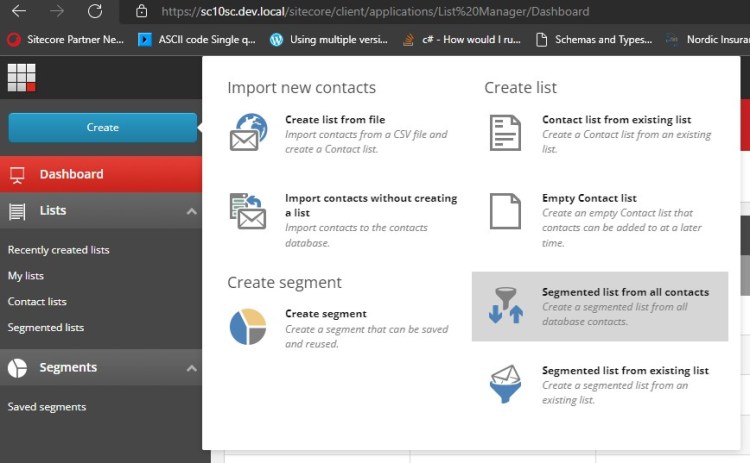
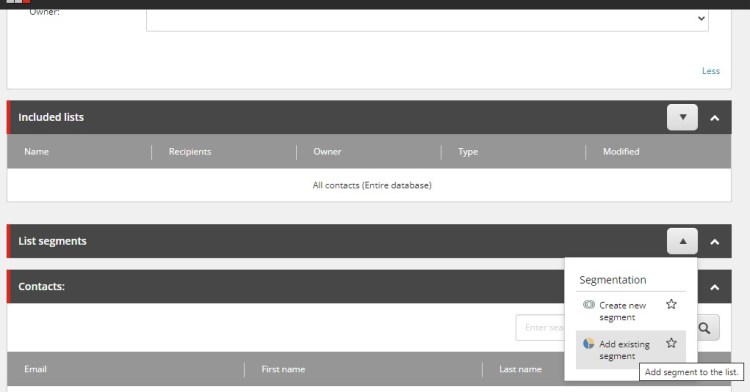

After clicking Save, the list will be populated with the contacts matching the segment rule – gender male and DOB between 01/01/1990 and 01/01/1995

P.S:
- This still doesn’t solve ‘the age of the contact gets updated everyday and the list wont be updated everyday problem.’
- But, using this segmented list, before starting any campaign or any marketing automation, we can generate a list based on their date of birth range and use them for that campaign.
 Sitecore Blog
One thought on “Sitecore – Segments and Segmented List”