
Setting the context:
Recently, got an opportunity to explore Sitecore’s ‘CDP & Personalize’ – “Engagement Cloud” SaaS products. (Yea.. Content Cloud..Commerce Cloud…Enagement Cloud what’s this recent OBSESSION with word “CLOUD”?)
Very beginning when Sitecore bought Boxever, I checked it out (Around March 2021). Now that all the fuzz is down and lot of upgrades have been made to the product, thought I will get myself updated.
This post is more of a “Getting Started with CDP”.
So…What’s Sitecore CDP?
According to Sitecore.com,
“A Customer Data Platform is packaged software that creates a persistent, unified customer database that is accessible to other systems“.
In the XP world, we used to have the xConnect/xDb components right? Where we have modules to get the behavioral data of a user/visitor – The Experience Profile/Experience Analytics/Lists/Segments/Reports part. They are not accessible to other systems OOTB. Of course there is XConnect API but most of the time you have write something on top of it to share the data with other systems. This is a bigger and way…way latest version of that. Consider it from a Global Enterprise perspective, where you have customers across globe, different apps for different channels for customers. (Online/Offline) and you have to collect, merge, process, segment and provide options to expose these data to other systems. Sitecore XP Marketing Applications modules isn’t robust enough to handle such scenarios.
Composability and Cloud first:
The Experience Profile/Analytics part can only capture/process/manipulate/be used for only the sites defined in your sitecore instance, Sitecore CDP can be integrated with any site directly. This means that you can run your marketing websites on any platform but still can use Sitecore CDP. Also, as the Experience Profile/Analytics and other such modules are a part of Sitecore XP, it needs XP to be installed and managed by us. Where as Sitecore CDP is “Cloud based” in doesn’t need to be installed/maintained. It can directly be consumed.
Alright I could hear you thinking, enough with the bla bla, SHOW ME THE MONEY!

*Source: Discover Sitecore
Data from customer touchpoints/Other Data warehouse can be ingested via Stream APIs/Batch APIs and can then later the data can be requested for manipulation via Interactive API. These customer data can then be exposed various inbuild models/external Amazon..Azure..or any other ML models for processing -> for segmenting, profiling, audience sync etc.
Zooming IN on the Integration Process,
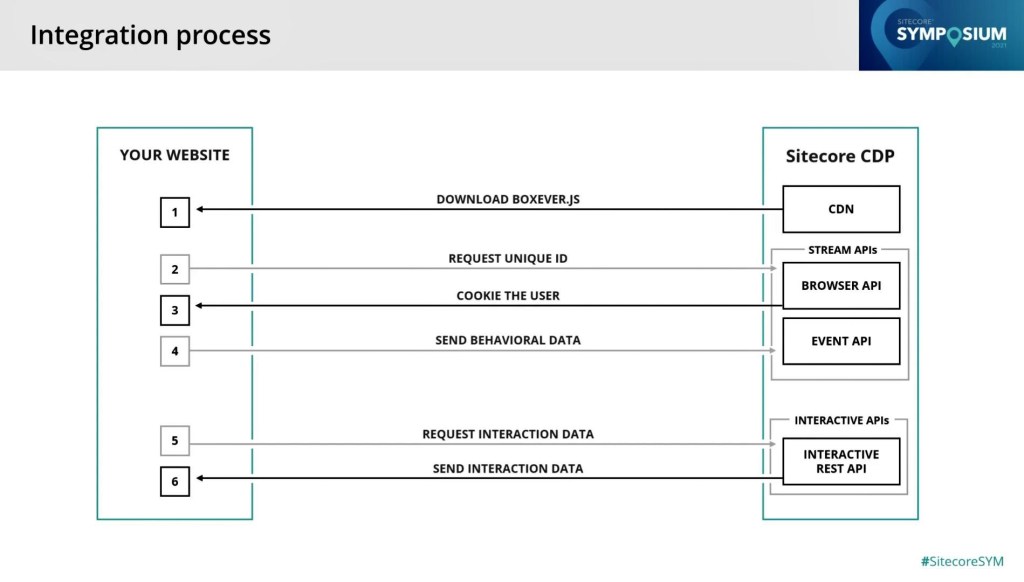
*Source: Discover Sitecore
Please read Boxever.js as Engage.js. Will explain this later.
- For integrating Sitecore CDP, one would be injecting “Engage.js” to the web application. This library requests an unique ID from Browser API, a cookie is set in the client.
- From then, all the behavioral data like view a page, clicking on a button, registering/adding items to cart etc will be captured and sent to CDP via Events API.
- To elaborate about Interactive API say we need a user’s marketing preference. This is a simple true or false attribute associated with the customer. When user makes changes to their marketing preference from any of the application(Web/Mobile/Front Office or stores) this data needs to be updated to customer data in CDP. For this purpose, Interactive API will be leveraged.
There are several approaches for integrating CDP with an web application,
- Client-side integration using the Engage SDK script and a TMS
- Client-side integration using the Engage SDK script
- Integration using the Engage SDK package
- Server-side integration using direct HTTP requests
The suitable approach depends upon the nature of the application(.NET Core Web App/ React/Angular/Next based app). The entire documentation on this can be found in this page. For my learning purpose I used the simplest approach – integrating using a Tag Management System – Google Tag Manager.
Integrating CDP with you Application using GTM
- Create a tag in GTM based on the script from doc.sitecore.com

<script>
    // Initialize the engage variable
    var engage = undefined;

    // Create and inject the <script> tag into the HTML
    var s = document.createElement("script");
    s.type = "text/javascript";
    s.async = true;
    s.src = "https://d1mj578wat5n4o.cloudfront.net/sitecore-engage-v.1.3.0.min.js";
    var x = document.querySelector("script");
    x.parentNode.insertBefore(s, x);

    // Initialize the Engage SDK
    s.addEventListener("load", function () {
      var settings = {
        clientKey: "<client_key_PLACEHOLDER>",
        targetURL: "<stream_api_target_endpoint_PLACEHOLDER>",
        pointOfSale: "<point_of_sale_PLACEHOLDER>",
        cookieDomain: "<cookie_domain_PLACEHOLDER>",
        cookieExpiryDays: 365,
        forceServerCookieMode: false,
        includeUTMParameters: true,
        webPersonalization: "<boolean_or_object>"
    };

    window.Engage.init(settings).then(function (result) {
      engage = result;

      // Send a VIEW event
      var event = {
        channel: "<channel_PLACEHOLDER>",
        language: "<language_PLACEHOLDER>",
        currency: "<currency_PLACEHOLDER>",
        page: "<page_PLACEHOLDER>"
      };
     engage.pageView(event);
    });
  });
- Create a POS in CDP
- POS stands for Point Of Sale. This like creating multisite in a single sitecore instance. In real life, POS can be a customer service portal/ customer service mobile app or offline retail store.
- Within CDP, POS is the central point. Where all customer behavioral data/application analytics will be grouped.
- POS can be created in CDP Settings->Point of Sale->Create

- While creating POS these are the 5 mandatory details that needs to be given.
- Timeout here refers to the user’s browser session timeout.

Get the Google Container Code and inject it to your web application

I used my personal old sitecore instance that still runs on MVC. So adding it in the Main Layout.

And if everything goes well, now we will be able to see the data in CDP based on the user interaction to your app.


Cool!
Behind The Screen:
- Remember earlier I mentioned that after we inject the Engage script, the script would call Stream API when the session loads. You can see this below.

- This customer_ref can be queried in CDP.


That’s it with CDP for now, my next article is about an issue I faced while creating an experience. So to conclude this article I would like to share a small detail about the modules available in CDP and Personalize. Sitecore provides options for Sitecore CDP separately, Sitecore Personalize separately or Sitecore Smart Hub CDP. Felt that this would be good to know as what are the modules available in each package. Experience comes in as a part of Personalize.
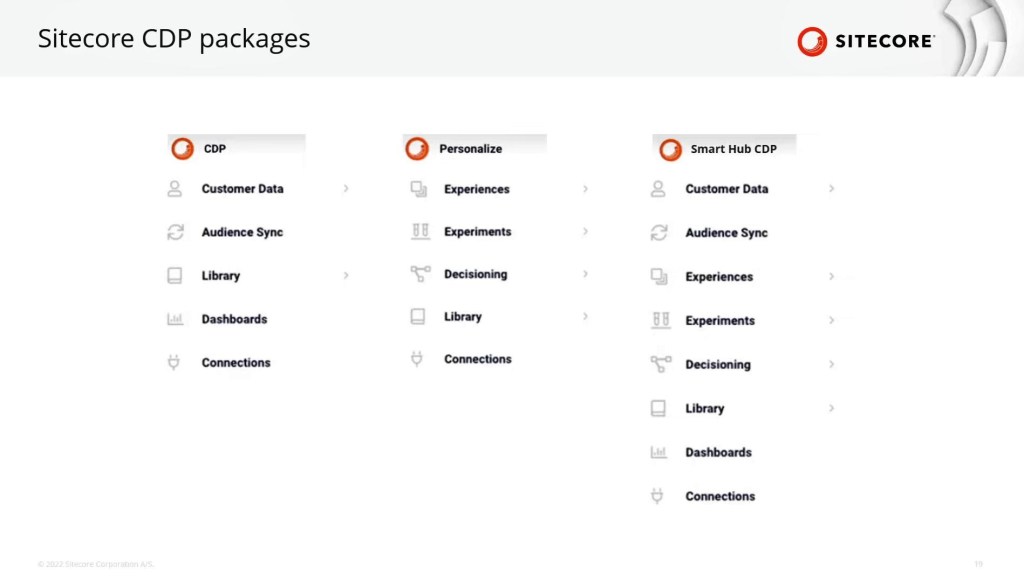
 Sitecore Blog
One thought on “Sitecore – Customer Data Platform”